

Custom Jobs
Explore common Custom Jobs, compare supported data, and choose direct purchase or technical review based on your requirements.
Custom Jobs
Section titled “Custom Jobs”Custom Jobs address migration requirements that need tailored processing beyond the supported standard scope. This catalog explains common functions and supported data so you can identify the work your migration needs. Checkout lists only the predefined jobs eligible for your selected Source-to-Target path. If the job and intended result are clear, you can select and purchase it directly. If you are unsure which job fits, describe your requirements through Request a Quote for Next-Cart technical review.
Explore Custom Jobs
Section titled “Explore Custom Jobs”Choose a category to compare the functions and supported data. Availability for direct purchase depends on the selected migration path in Checkout.
Product customization
Section titled “Product customization”| Custom Job | Function | Supported Data | Example Use Case |
|---|---|---|---|
| Customize product types | Add or change product types to match the target structure. | Product Types | Turn individual variants into separate simple products. |
| Customize product information | Modify general product details, SEO and structured data, or inventory fields according to your requirements. | Product Information Product SEO / Structured Data Product Inventory | Remove HTML tags from product descriptions. |
| Customize product pricing | Customize product prices and pricing settings. | Product Pricing | Add quantity-based price tiers or prices for specific customer groups. |
| Customize product options and variants | Add or adjust product options and variant rules. | Product Options Product Variants | Apply a fixed set of size options—S, M and L—to all products. |
| Adjust product images | Adjust product image dimensions, aspect ratios and file sizes to meet your requirements. | Product Images | Create square images smaller than 20 MB. |
| Customize product attributes and custom fields | Add, modify or migrate product attributes and custom fields. | Product Attributes & Custom Fields | Product data introduced by third-party modules or extensions. |
| Transfer product download files | Transfer and store product download files on the target platform, then link them to the corresponding products. | Product Downloads | Transfer the files via SSH where applicable. |
| Customize product links and relationships | Create or adjust links between products, categories and related data. | External Links / Relationships | Link related products based on matching product names. |
Category customization
Section titled “Category customization”| Custom Job | Function | Supported Data | Example Use Case |
|---|---|---|---|
| Customize category information and hierarchy | Modify category details or reorganize the category hierarchy. | Category Information Category Structure / Hierarchy | Build a new category structure from product tags. |
| Customize category images | Set or adjust category images. | Category Images | Use the image of the first product in each category as its category image. |
Manufacturer customization
Section titled “Manufacturer customization”| Custom Job | Function | Supported Data | Example Use Case |
|---|---|---|---|
| Customize manufacturer information | Modify manufacturer details and branding data, or create manufacturer records from existing data. | Manufacturer Information Manufacturer Branding | Use product categories to create manufacturer records. |
Customer customization
Section titled “Customer customization”| Custom Job | Function | Supported Data | Example Use Case |
|---|---|---|---|
| Customize customer information and addresses | Modify customer details and addresses. | Customer Information Customer Addresses | Add addresses to customer profiles using shipping addresses from their linked orders. |
Order customization
Section titled “Order customization”| Custom Job | Function | Supported Data | Example Use Case |
|---|---|---|---|
| Customize order information | Modify order details or add information from other sources. | Order Information | Import tracking numbers stored by a third-party module. |
| Link orders to existing products and variants | Match order line items to products and variants already on the target platform, without re-importing those products. | Product Details Order Relationships | Match items by SKU or product name. |
| Link orders to existing customers | Match orders to customer accounts already on the target platform, without re-importing those accounts. | Customer Details Order Relationships | Match accounts by email address or phone number. |
Data imports
Section titled “Data imports”These jobs handle project-specific file, SQL-export or API structures that require custom import processing. Each job maps the supplied Source data to the agreed Target data structure.
| Source | Product Import | Customer and Order Import |
|---|---|---|
| CSV | Import products from CSV Map CSV columns and values to Target Product data. | Import customers and orders from CSV Map CSV fields and Customer–Order relationships to Target data. |
| XML | Import products from XML Map XML elements and attributes to Target Product data. | Import customers and orders from XML Map XML elements, attributes and Customer–Order relationships to Target data. |
| XLS | Import products from XLS Map XLS workbook sheets, columns and values to Target Product data. | Import customers and orders from XLS Map XLS sheets, columns and Customer–Order relationships to Target data. |
| SQL | Import products from SQL Map SQL tables, fields and relevant Product relationships into Target Product data. | Import customers and orders from SQL Map SQL export tables, fields and Customer–Order relationships to the Target. |
| API | Import products from an API Map API fields and values to Target Product data. | Import customers and orders from an API Map API fields and Customer–Order relationships to Target data. |
SQL and API entries refer to individually assessed Custom Jobs. They do not mean SQL or API is available as a generic Source Platform selection.
Scope, engineering readiness and reuse
Section titled “Scope, engineering readiness and reuse”- Direct purchase for defined requirements. Under Choose Custom Jobs, select only jobs offered for your Source-to-Target path when you understand what each job does and how it meets your intended Target result. Review the job details, selected count, and complete Checkout total before payment. A catalog entry does not guarantee availability for every path.
- Technical review when uncertain. Use Request a Quote if a listed job does not clearly fit, the required work is outside the available list, or you need help defining the correct solution. Describe the Source data, intended Target result, constraints, and dependencies so Next-Cart can assess the scope and provide an appropriate quotation. This cannot be combined with direct job selection in one checkout transaction.
- Engineering readiness for every Custom Job. Whether a predefined job is purchased directly or the work is individually quoted, payment alone does not make it executable. Next-Cart’s technical team builds, configures, tailors, and verifies the approved work for your migration environment, then confirms readiness before dependent execution.
- Reuse conditions. A job may be reused for another Target Store only when the applicable Target identity is not locked and both Target Stores have exactly matching structures, including all data-related applications, extensions and configurations on which the job depends. A matching platform or database schema alone is insufficient. See Store URL Locking and Store Identity.
This catalog lists common Custom Jobs, not every type of work that Next-Cart may assess through Custom Migration.
Purchase Custom Jobs or request a quote
Section titled “Purchase Custom Jobs or request a quote”Select Custom under Service & Volume in Checkout. Choose Self-Execute or Expert Handle for migration operation, then use one of these alternatives:
| Checkout option | Best suited for | What happens next |
|---|---|---|
| Choose Custom Jobs | Customers who can identify the required job from its function, supported data, and desired result. Select only jobs offered for the chosen migration path. | Review descriptions, selected jobs, and the full checkout total; purchase directly. Next-Cart then prepares and verifies the approved jobs for the migration. |
| Request a Quote | Customers who are unsure which job fits or need individually scoped work not clearly covered by the displayed list. | Describe the requirements and provide examples or specifications as needed. Next-Cart reviews the scope and provides an individual quotation before payment and engineering preparation. |
Choose Custom Jobs
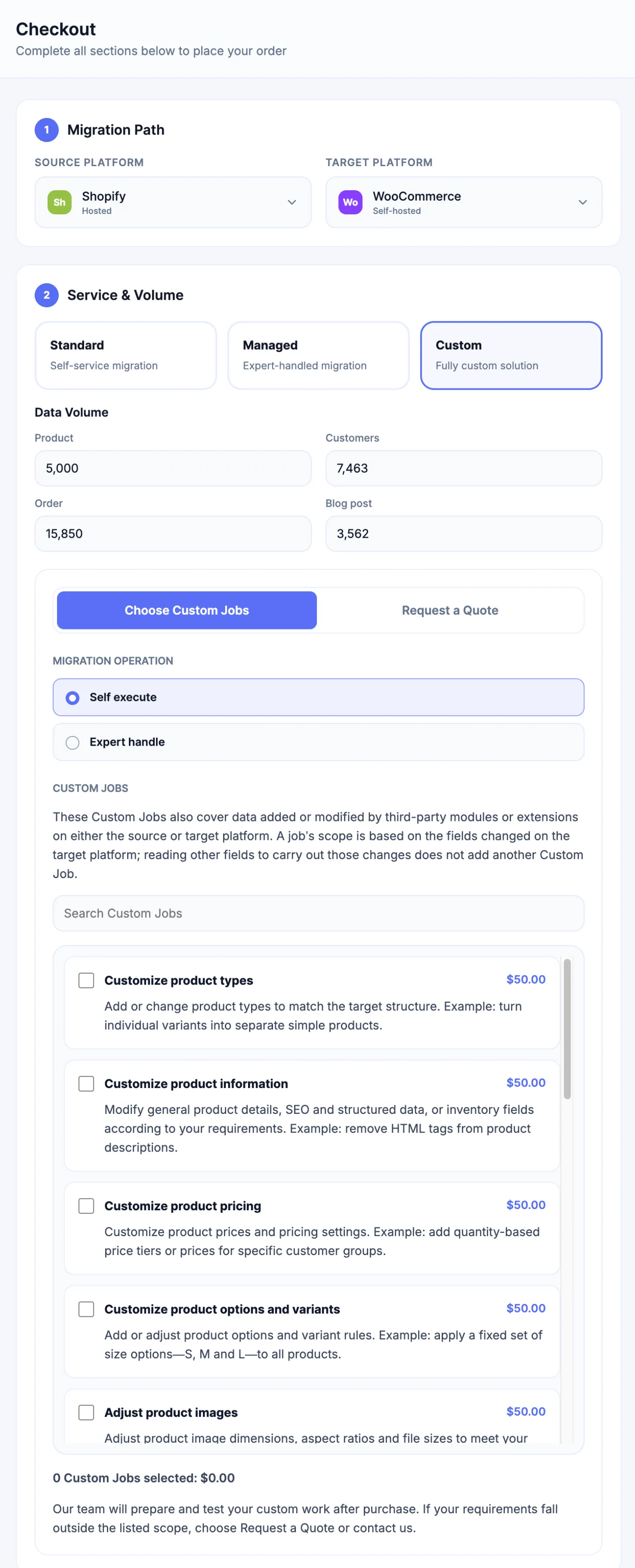
Section titled “Choose Custom Jobs”The Choose Custom Jobs tab lists predefined jobs available for the selected Source-to-Target path, with descriptions and a selection summary. Direct purchase is most useful when you already understand how a listed job addresses your migration requirement; otherwise use Request a Quote for assistance.
Request a Quote
Section titled “Request a Quote”The alternative Request a Quote tab lets you describe the intended data, target result, and constraints, with optional attachments. Use this option when the right Custom Job or solution is unclear, or when your requirement needs individual assessment. It is not an extra form attached to a predefined-job purchase.
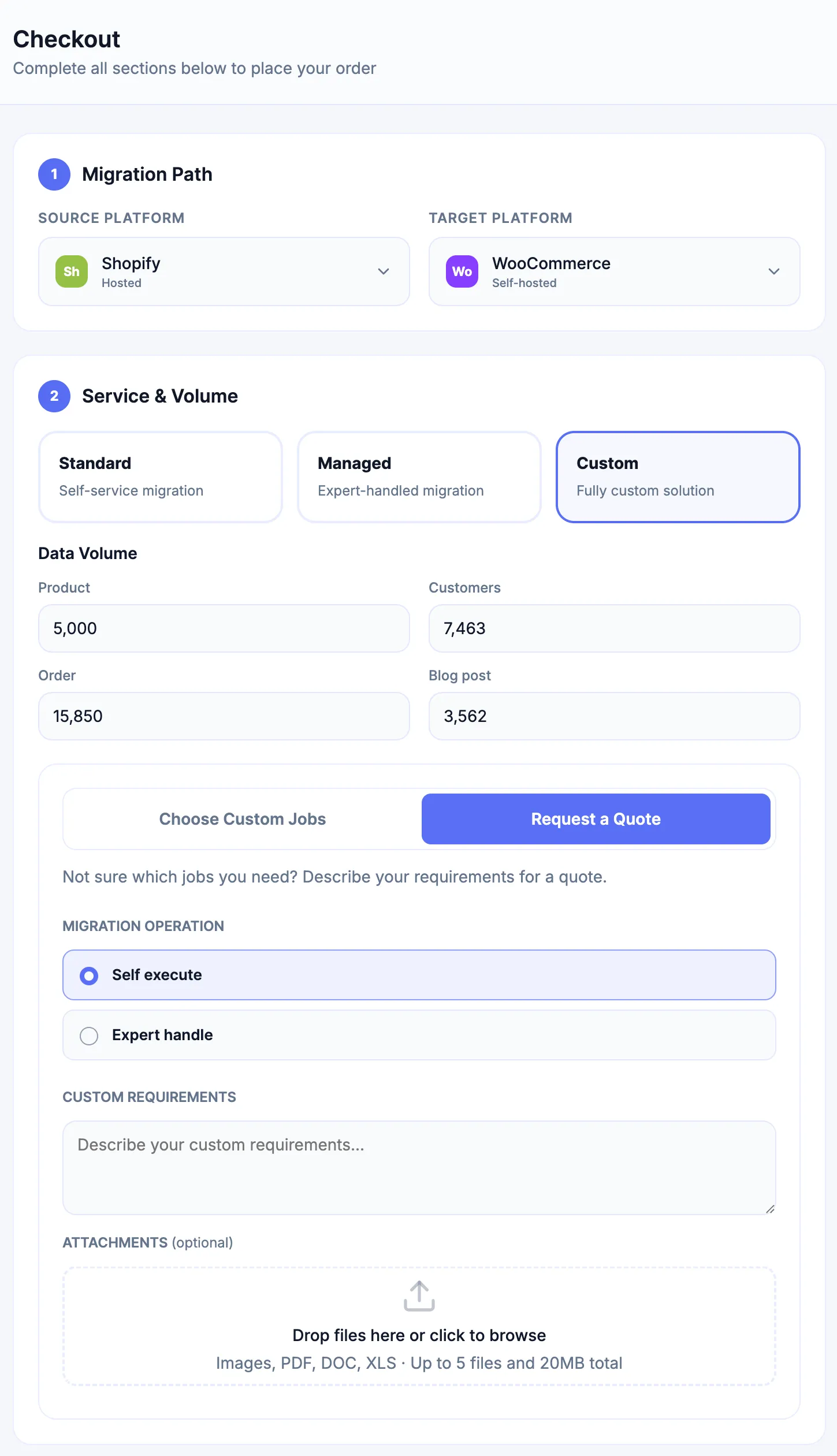
You cannot use both checkout options simultaneously. If the predefined list does not cover the required work, use Request a Quote rather than selecting an unrelated job.
For the illustrated procedures, payment states and engineering-readiness requirements, see Purchase a Migration. For a technical requirement template, see Prepare Custom Migration Requirements. For work on an existing migration, see Purchase a Migration Upgrade or Support Tickets.