Skip to content
Back to Site

Bluepark API Connection

Prepare Bluepark API access details for the Next-Cart migration service.

A valid Bluepark API connection gives Next-Cart the authorized platform access required by the selected migration path.

The goal is to enable or locate API access for an admin user and prepare the API URL, API Username, and API Key for connection testing.

Use this guide when:

  • the selected platform is Bluepark;
  • Next-Cart asks for Bluepark API details;
  • you can access the Bluepark admin;
  • you can manage admin-user API access.
RequirementWhy it matters
Admin accessYou need access to the Bluepark admin area.
Permission to manage admin usersAPI details are associated with admin user access settings.
Migration scopeAPI access should support the data types selected for migration.
Secure storageAPI keys should be copied directly into Next-Cart or stored securely.
ValueWhere to find itNotes
Store URL or API access URLAdmin user API access settings.Use the value shown for API access when available.
API UsernameAdmin Panel Access and Authorisation area.Copy it exactly.
API KeyAdmin Panel Access and Authorisation area.Copy it exactly.
  1. Sign in to the Bluepark admin.
  2. Open Users.
  3. Open Admin Manager.
  4. Select the admin user used for API access.
  5. Open the Properties tab.
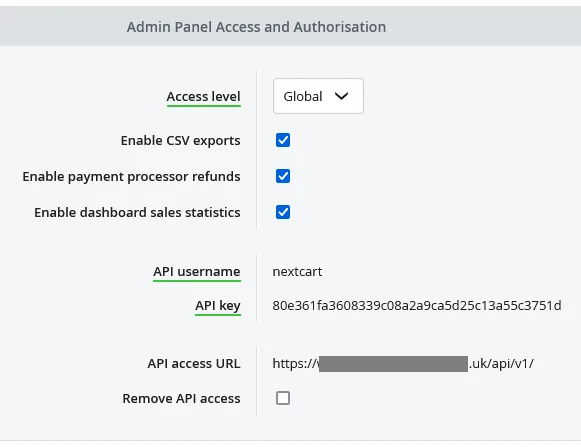
  6. Locate Admin Panel Access and Authorisation.
  7. Enable API access if it is disabled.
  8. Copy the API Username, API Key, and API access URL if shown.

In Next-Cart, enter the Bluepark Store URL or API access URL, API Username, and API Key.

Use values from the Bluepark store associated with the purchased migration path.

Next-Cart has the Bluepark API details required for connection testing.

CheckPass condition
API accessAPI access is enabled for the admin user.
API UsernameThe username is copied exactly from Bluepark.
API KeyThe key is copied exactly from Bluepark.
API access URLThe URL matches the intended Bluepark store.
Connection testNext-Cart verifies access without authentication or permission errors.
IssueWhat to check
Invalid username or keyRe-copy the API Username and API Key from the admin user settings.
API disabledConfirm API access is enabled in the user properties.
Wrong userConfirm you selected the admin user intended for API access.
Wrong store URLConfirm the URL belongs to the selected Bluepark store.
Permission issueConfirm the admin user has the required access for the selected migration scope.

After migration work is complete and verified, disable API access or regenerate the API Key if the credentials are no longer needed.

SituationGo to
API values are readyVerify Platform Connections
You need general API setup guidanceSet Up an API Connection
The connection test failsTroubleshoot Connection Setup