

Additional Options
Configure migration-wide behavior and platform-specific Source Store and Target Store processing options available for the active migration path.
Additional Options
Section titled “Additional Options”Additional Options appears during the Configuration step and controls how selected data is read, transformed, preserved, or written beyond the basic data-type selection.
The page is dynamic. Next-Cart shows only the controls supported by the active Source Platform, Target Platform, migration path, and migration context. Do not expect every option documented here to appear in every migration.
Option groups
Section titled “Option groups”Configure and review the options
Section titled “Configure and review the options”-
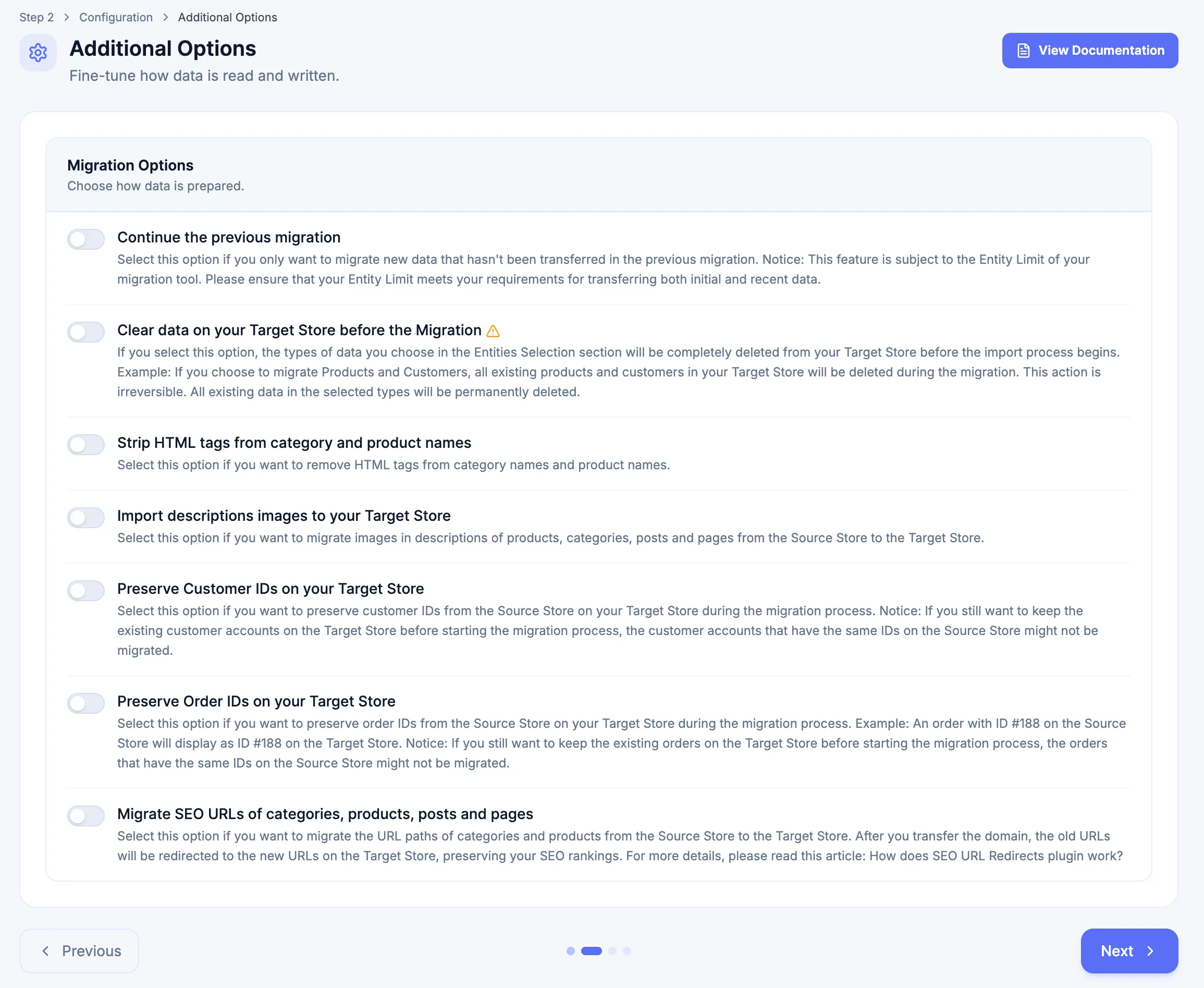
In the Configuration step, review the Migration Options shown for the active migration.
-
Review Source Store options when that group appears and confirm that each value matches the Source Platform’s native data model.
-
Review Target Store options when that group appears and confirm that each value matches the intended Target Platform representation.
-
Recheck destructive, identifier-preservation, price/tax, URL, and Continue-action and Continue the previous migration choices before continuing.
-
Click Next after the option set is confirmed.
Migration Options
Section titled “Migration Options”Migration Options apply to the migration activity rather than belonging to one platform-specific Source or Target group.
Available controls can include:
| Option | Use it when | Important distinction |
|---|---|---|
| Continue the previous migration | Carry forward the most recent migration state for ordinary new-record processing. | Preserves supported relationship context for the new-data pass. It is not Resume Migration and is unavailable in Demo Migration. |
| Clear data on your Target Store before the Migration | Remove selected Target Store data before replacement data is imported. | Destructive and irreversible from the migration workflow. Unavailable in Demo Migration. |
| Import descriptions images to your Target Store | Keep supported images embedded in description content usable on the Target Store. | Applies to description-embedded images, not standard Product gallery/media migration. |
| Preserve Customer IDs on your Target Store | Keep Source Customer identifiers when the active path and target representation support them. | Check existing target identities and platform constraints first. Unavailable in Demo Migration. |
| Preserve Order IDs on your Target Store | Keep Source Order identifiers when the active path and target representation support them. | Use the target-supported identifier or order-number mechanism; never force unsupported internal database IDs. Unavailable in Demo Migration. |
| Migrate SEO URLs of categories, products, posts and pages | Preserve supported source URL paths or prepare them for redirect handling. | Validate the target redirect mechanism and representative old-to-new destinations separately. |
Migrate only new data while preserving earlier relationships
Section titled “Migrate only new data while preserving earlier relationships”Continue the previous migration is an Additional Option, not a Migration Action. For ordinary new-record processing, enabling it carries the state of the most recent migration into the next pass:
- records already represented as transferred in that previous migration remain part of the carried state;
- records not transferred in that state form the new-data delta for the current migration;
- supported relationships can use the carried state when later records must connect to data from the most recent migration.
The Migration Action determines whether the next run reuses the last saved configuration or reopens the Configuration step. Continue the previous migration determines the carried migration state and delta window.
- Open the same paid Migration in My Migrations.
- In the Connect Stores step, select Continue previous migration for Continue the Migration with Last Saved Configuration, or select Continue previous + reconfig for Continue the Migration with a New Configuration.
- Open Configuration when needed. If Continue previous migration routes directly to the Migration step, use Edit Config before starting when the next pass requires configuration changes.
- In Additional Options, enable Continue the previous migration.
- Select the supported data types required for the later pass and review the rest of Configuration.
- Continue to the Migration step, start the activity, and validate the newly imported records together with their relationships to data migrated earlier.
For example, if Orders completed in the most recent migration and new Orders were added afterward, enable Continue the previous migration in the next migration to carry the completed Order state forward and process only the Orders that were not transferred in that previous migration.
Two-pass example: replace Categories first, then migrate Products
Section titled “Two-pass example: replace Categories first, then migrate Products”Use separate passes when Categories must be replaced but Products must remain linked to the newly migrated Categories. If Categories and Products are selected in the same pass while Clear data on your Target Store before the Migration is enabled, the migration clears both selected Target Store data types before replacement. Separate passes avoid deleting the existing Target Store Products when only Categories need to be replaced.
Pass 1: Categories only
If this is the first paid Migration activity, use the Start a new migration UI label for Perform a New Migration.
- Select Categories under Select Data.
- Enable Clear data on your Target Store before the Migration.
- Complete Configuration and run the Migration.
- Validate that the intended Target Store Categories were cleared and replaced correctly.
Pass 2: Products only
- Return to the same purchased Migration.
- In the Connect Stores step, select Continue previous + reconfig because the selected data type changes from Categories to Products. This UI label corresponds to Continue the Migration with a New Configuration.
- Under Select Data, select Products and required dependencies for the active path.
- In Additional Options, enable Continue the previous migration.
- Do not enable Target Store clearing for Products unless deleting the existing Target Store Products is explicitly intended.
- Run the Migration and validate representative Product-to-Category relationships.
Without Continue the previous migration in Pass 2, the separate Product pass must not be assumed to reconstruct relational links to the Categories migrated in Pass 1. Use the same principle for later delta passes when new Source records must connect to entities represented in the most recent migration state.
Use Migration Actions and Additional Options for the complete distinction between Migration Actions, their literal Connect Stores labels, Continue the previous migration, other Additional Options, and interruption recovery.
Import description images
Section titled “Import description images”Use Import descriptions images to your Target Store when that option is displayed for the active migration path and images embedded inside supported description content must remain usable on the Target Store.
When enabled for the applicable path, the migration uploads the description images to the Target Store and updates the image links inside the migrated description so the content points to the new target-side image locations. This is separate from ordinary Product-gallery image migration.
Shopify targets
Section titled “Shopify targets”For a Shopify target, the migration uploads supported Product-description images to the Shopify store and updates the image links inside the Product description. Validate representative descriptions independently from the main Product gallery and confirm that the resulting target image references resolve correctly.
WooCommerce and WordPress targets
Section titled “WooCommerce and WordPress targets”For a WooCommerce or WordPress target, the migration imports supported images used inside the description and updates the description image links to the migrated target locations. Validate both the migrated content and the referenced target media.
Other target platforms
Section titled “Other target platforms”For another Target Platform, use the option only when Import descriptions images to your Target Store is actually displayed for the active path. When supported, validate the uploaded description assets and the rewritten target references separately.
Preserve Order IDs
Section titled “Preserve Order IDs”Use Preserve Order IDs on your Target Store when the option is displayed for the active migration path and retaining the Source Order identifiers is part of the approved result. Before enabling it, check for existing Target Store Orders or identifier conflicts. After migration, compare representative Source and Target Order IDs and verify that Customer, Product, and Order relationships still resolve correctly.
WooCommerce Order IDs and Sequential Order Numbers
Section titled “WooCommerce Order IDs and Sequential Order Numbers”WooCommerce uses the wp_posts table to store Products, images, posts, Orders, and other entities and uses the table primary key as the internal entity ID. Those IDs are unique, integer-based, and auto-incrementing. Forcing fixed values into those internal IDs can create conflicts or data-integrity problems.
For WooCommerce migrations where the original Source Order IDs must remain visible to customers, use a separate Order-number mechanism instead of forcing the underlying wp_posts primary key. A Sequential Order Numbers plugin can provide that customer-visible numbering layer.
- The plugin can be installed before or after migration.
- With the supported numbering mechanism, the original Source Order IDs can be displayed as the customer-visible Order numbers.
- Sequential Order Number plugins can also add a prefix and define the starting number for new Orders after go-live.
- Next-Cart can adapt the migration through the applicable Custom Migration scope so the chosen numbering mechanism receives the Source Order IDs correctly.
Do not interpret this procedure as permission to overwrite arbitrary WooCommerce internal database IDs.
Source Store options
Section titled “Source Store options”The Source Store group appears only when the selected Source Platform exposes supported platform-specific controls.
| Source Platform | Option | Selectable values / input |
|---|---|---|
| Drupal | Product Category Taxonomy | From DB table |
| eBay | eBay Site | Select the applicable eBay site shown by the migration. |
| eBay | Start Time From | Enter/select the supported starting time shown by the migration. |
| PrestaShop | Product Price Type | Tax excluded / Tax included |
| Shopware | Product Price Type | Net price / Gross price |
| Ubercart | Product Category Taxonomy | From DB table |
PrestaShop Product price options
Section titled “PrestaShop Product price options”When PrestaShop is the Source Platform, Source Store → Product Price Type controls which Source Product-price representation the migration reads:
- Tax excluded reads the Product price without tax included.
- Tax included reads the Product price with tax included.
When PrestaShop is the Target Platform, Target Store → Product Price Field controls which supported target price representation receives the migrated Product price:
- Tax excluded writes the migrated Product price to the tax-excluded representation.
- Tax included writes the migrated Product price to the tax-included representation.
Choose the Source interpretation and Target field according to the intended pricing result. After migration, validate representative Products against the configured PrestaShop tax rules rather than checking only a raw numeric price.
Shopware Product price options
Section titled “Shopware Product price options”When Shopware is the Source Platform, Source Store → Product Price Type provides:
- Net price
- Gross price
When Shopware is the Target Platform, Target Store → Product Price Field provides:
- Net price
- Gross price
Shopware can represent net and gross Product pricing in relation to its tax configuration. Select the price representation that matches the migration requirement, then validate representative Products together with their applicable tax rates. Do not reinterpret this Shopware-specific control as a universal gross/net rule for every platform.
Target Store options
Section titled “Target Store options”The Target Store group appears only when the selected Target Platform exposes supported platform-specific controls.
| Target Platform | Option | Selectable values / input |
|---|---|---|
| PrestaShop | Product Price Field | Tax excluded / Tax included |
| Shopify | Product Price Tax | Percentage value (%) |
| Shopify | Order Tax Status | Tax excluded / Tax included |
| Shopware | Product Price Field | Net price / Gross price |
| Squarespace | Order Tax Status | Default / Tax excluded / Tax included |
| WooCommerce | Order Tax Status | Default / Tax excluded / Tax included |
Shopify Product Price Tax and Order Tax Status
Section titled “Shopify Product Price Tax and Order Tax Status”For Shopify targets, Product Price Tax applies the configured percentage when the migration must adjust migrated Product prices. This migration-time price adjustment is separate from Shopify’s tax configuration for future transactions.
Order Tax Status determines whether supported historical Order amounts are interpreted/written using the selected Tax excluded or Tax included treatment for the active migration path.
Validate representative Product prices and historical Order totals after migration. Do not use these migration options as a substitute for configuring Shopify taxes for future checkout activity.
Order Tax Status for Squarespace and WooCommerce
Section titled “Order Tax Status for Squarespace and WooCommerce”When supported, Order Tax Status provides:
- Default to retain the platform/path default handling;
- Tax excluded when the migrated historical Order values should be treated without tax included;
- Tax included when the migrated historical Order values should be treated with tax included.
Validate representative subtotal, tax, shipping, discount, and total values after migration.
Combinations that need extra review
Section titled “Combinations that need extra review”| Combination | What to confirm |
|---|---|
| Data Update | Continuation is enabled, Target clearing is disabled, and the intended update fields are selected. |
| Continue action + Continue the previous migration + target clearing | Previously accepted target records will not be removed when the additional new Source data will not recreate them. |
| ID preservation + existing target records | Preserved identifiers will not conflict with records already present on the Target Store. |
| SEO URL migration + redirect execution | The migrated URL values and target redirect mechanism match the launch plan. |
| Source price interpretation + Target price field | Gross/net or tax-included/tax-excluded semantics produce the intended storefront/admin result. |
If a required option is not displayed, do not substitute a similarly named control. The missing option is not available for that active configuration unless the migration scope is reviewed through an approved path.
When migrated URL paths require redirect execution, some Target Platforms can use native redirect handling while other approved migrations can use the SEO URL Redirects Plugin. Do not infer a redirect mechanism from the option label alone.
Next Steps
Section titled “Next Steps”Continue to Attribute Mapping to review standard value mappings. Use Previous to return to Select Data if the data-type scope needs adjustment.