Skip to content
Back to Site

CommerceHQ API Connection

Prepare CommerceHQ private app API details for the Next-Cart migration service.

A valid CommerceHQ API connection gives Next-Cart the authorized platform access required by the selected migration path.

The goal is to create or locate private app credentials and prepare the Store URL, API Key, and API Password for connection testing.

Use this guide when:

  • the selected platform is CommerceHQ;
  • Next-Cart asks for CommerceHQ API credentials;
  • you can access the CommerceHQ admin;
  • you can create or manage private apps.
RequirementWhy it matters
Admin accessYou need access to the CommerceHQ admin area.
Permission to manage appsAPI credentials are created or viewed through private app settings.
Migration scopeApp access should include the resources selected for migration.
Secure credential handlingAPI passwords must be protected and entered only through approved channels.
ValueWhere to find itNotes
Store URLYour CommerceHQ store URL.Use the store associated with the purchased migration path.
API KeyPrivate app settings.Copy it exactly.
API PasswordPrivate app settings.Treat it as sensitive.
  1. Sign in to the CommerceHQ admin.
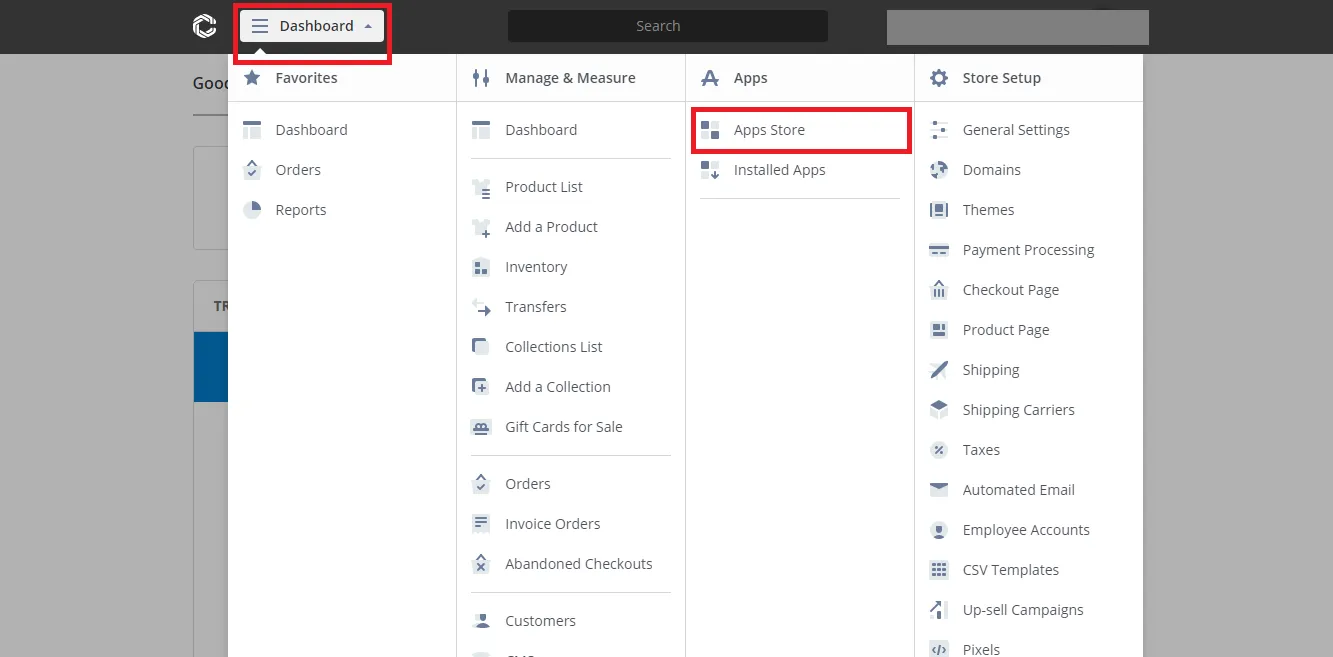
  2. Open the dashboard.
  3. Go to Apps Store.
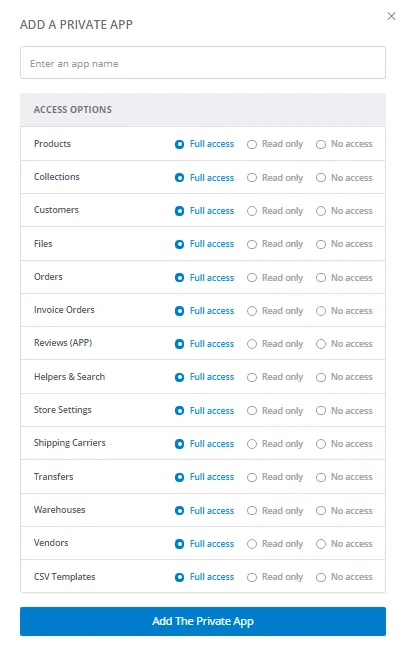
  4. Select Add a Private App.
  5. Enter a recognizable private app name such as Next-Cart Migration.
  6. Grant access to the resources included in the migration scope, such as Products, Orders, and Customers.
  7. Save the private app.
  8. Open the private app settings from installed apps.
  9. Copy the API Key and API Password.

In Next-Cart, enter the CommerceHQ Store URL, API Key, and API Password.

Use credentials from the store included in the purchased migration path.

Next-Cart has the CommerceHQ API details required for connection testing.

CheckPass condition
Private appThe app exists and is active.
Store URLThe URL belongs to the intended CommerceHQ store.
API KeyThe key is copied exactly from private app settings.
API PasswordThe password is copied exactly and stored securely.
Resource accessThe app has access to the selected migration resources.
Connection testNext-Cart verifies access without authentication or permission errors.
IssueWhat to check
API Key rejectedRe-copy the API Key from private app settings.
API Password rejectedRe-copy the API Password or create a new private app.
Resource access errorConfirm the private app has access to Products, Orders, Customers, and other selected data.
Wrong store URLConfirm the Store URL matches the intended CommerceHQ store.
App deleted or disabledCreate a new private app and enter the new values in Next-Cart.

After migration work is complete and verified, remove the private app or reduce its access if it is no longer needed.

SituationGo to
API values are readyVerify Platform Connections
You need general API setup guidanceSet Up an API Connection
The connection test failsTroubleshoot Connection Setup