ShopWired API Connection
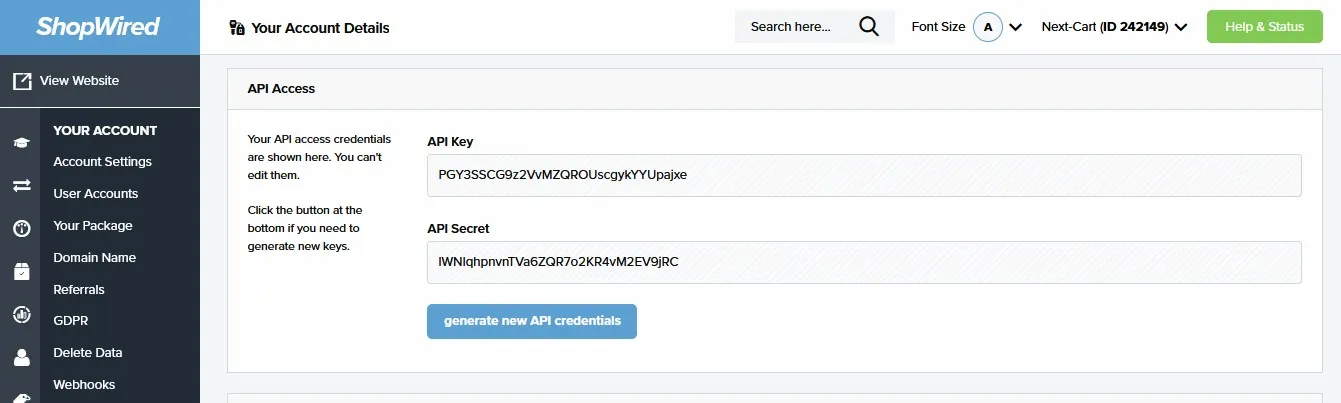
Prepare ShopWired API Key and API Secret for a Next-Cart migration service when ShopWired API setup is shown.
ShopWired API Connection
Section titled “ShopWired API Connection”A valid ShopWired API connection gives Next-Cart the authorized platform access required by the selected migration path.
Next-Cart may ask for a ShopWired API Key and API Secret. Prepare these values from the correct ShopWired admin or integration settings area.
When to use this guide
Section titled “When to use this guide”Use this guide when:
- ShopWired is the Source Platform or Target Platform in your selected migration path;
- Next-Cart shows ShopWired API setup;
- Next-Cart asks for API Key, API Secret, or related ShopWired connection values.
Prerequisites
Section titled “Prerequisites”Before you begin, confirm that:
| Requirement | Why it matters |
|---|---|
| ShopWired admin access | You need access to the correct ShopWired account. |
| Permission to manage API credentials | The account must be allowed to view or generate API credentials. |
| Scope decisions | You need to know which data types Next-Cart must access. |
| Secure storage | API credentials should be copied only into approved secure locations. |
Required values
Section titled “Required values”| Required value | Where to prepare it | Notes |
|---|---|---|
| API Key | ShopWired API or integration settings | Copy the full value. |
| API Secret | ShopWired API or integration settings | Treat this value as sensitive. |
Prepare the API connection values
Section titled “Prepare the API connection values”- Sign in to the ShopWired admin for the correct store.
- Open the account, integrations, settings, or API area where API credentials are managed.
- Generate a new API key pair if one is not already available for the migration service.
- If an existing key pair is available, confirm that it belongs to the correct store and has suitable access.
- Copy the API Key.
- Copy the matching API Secret.
- Store both values securely until you enter them in Next-Cart.
Enter the values in Next-Cart
Section titled “Enter the values in Next-Cart”In the Next-Cart connection setup screen, enter only the values requested by the interface.
| Next-Cart field | Platform value |
|---|---|
| API Key | ShopWired API Key. |
| API Secret | Matching ShopWired API Secret. |
Expected result
Section titled “Expected result”The ShopWired API connection values are ready to test in Next-Cart.
Verify the connection
Section titled “Verify the connection”| Check | Pass condition |
|---|---|
| Store match | The API credentials belong to the selected ShopWired store. |
| Credential pair | The API Key and API Secret come from the same key pair. |
| Access readiness | The credentials allow access to the data shown by Next-Cart. |
| Connection test | Next-Cart can authenticate and read supported ShopWired data. |
If the connection fails
Section titled “If the connection fails”| Issue | What to check |
|---|---|
| Authentication error | Re-copy the API Key and API Secret, and confirm they are a matching pair. |
| Wrong store | Confirm you are signed in to the correct ShopWired admin. |
| Missing data access | Confirm the key pair has access to the required data areas. |
| Credential area unavailable | Ask the store owner or ShopWired admin to provide API credential access. |
Security cleanup
Section titled “Security cleanup”After migration work is complete and verified:
- remove or revoke temporary API credentials where the platform provides that option;
- reduce access if a broader permission set was used only for migration work;
- remove copied credentials from insecure notes, tickets, chats, or shared files;
- review the store admin account or API user used for API setup.
Next step
Section titled “Next step”| Goal | Go to |
|---|---|
| Test the connection | Verify Platform Connections |
| Fix an authentication or permission issue | Troubleshoot Connection Setup |
| Continue after the connection passes | Configure Your Migration |