

Configure Advanced Data Mapping
Map supported source fields to compatible target fields and review the field registry directly in the configuration guide.
Configure Advanced Data Mapping
Section titled “Configure Advanced Data Mapping”Advanced Data Mapping routes a supported source field to a compatible target field. Mapping changes where the value is written; it does not change the value during the mapping operation.
Each rule uses Source Field -> Target Field.
Configure a mapping
Section titled “Configure a mapping”-
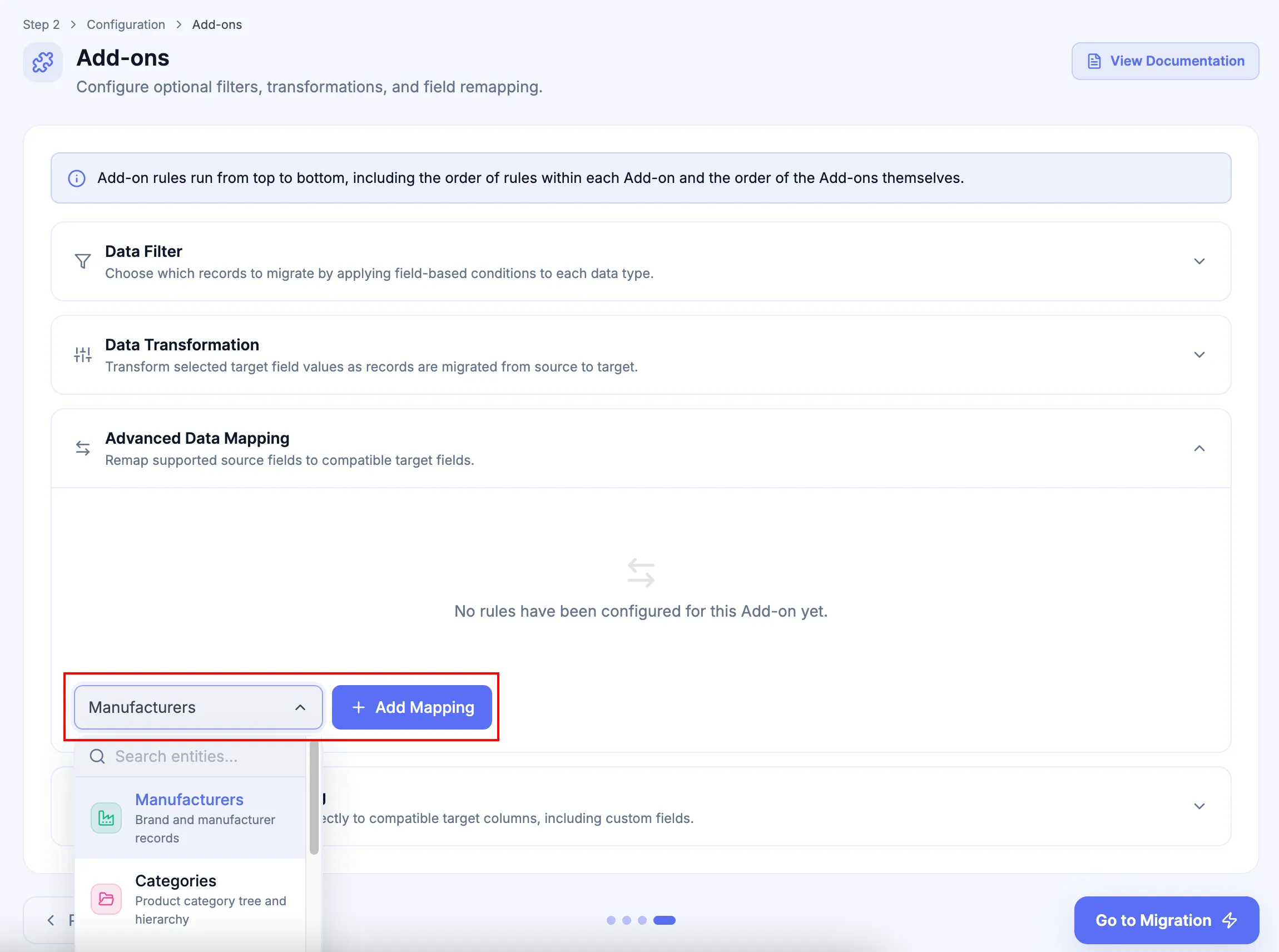
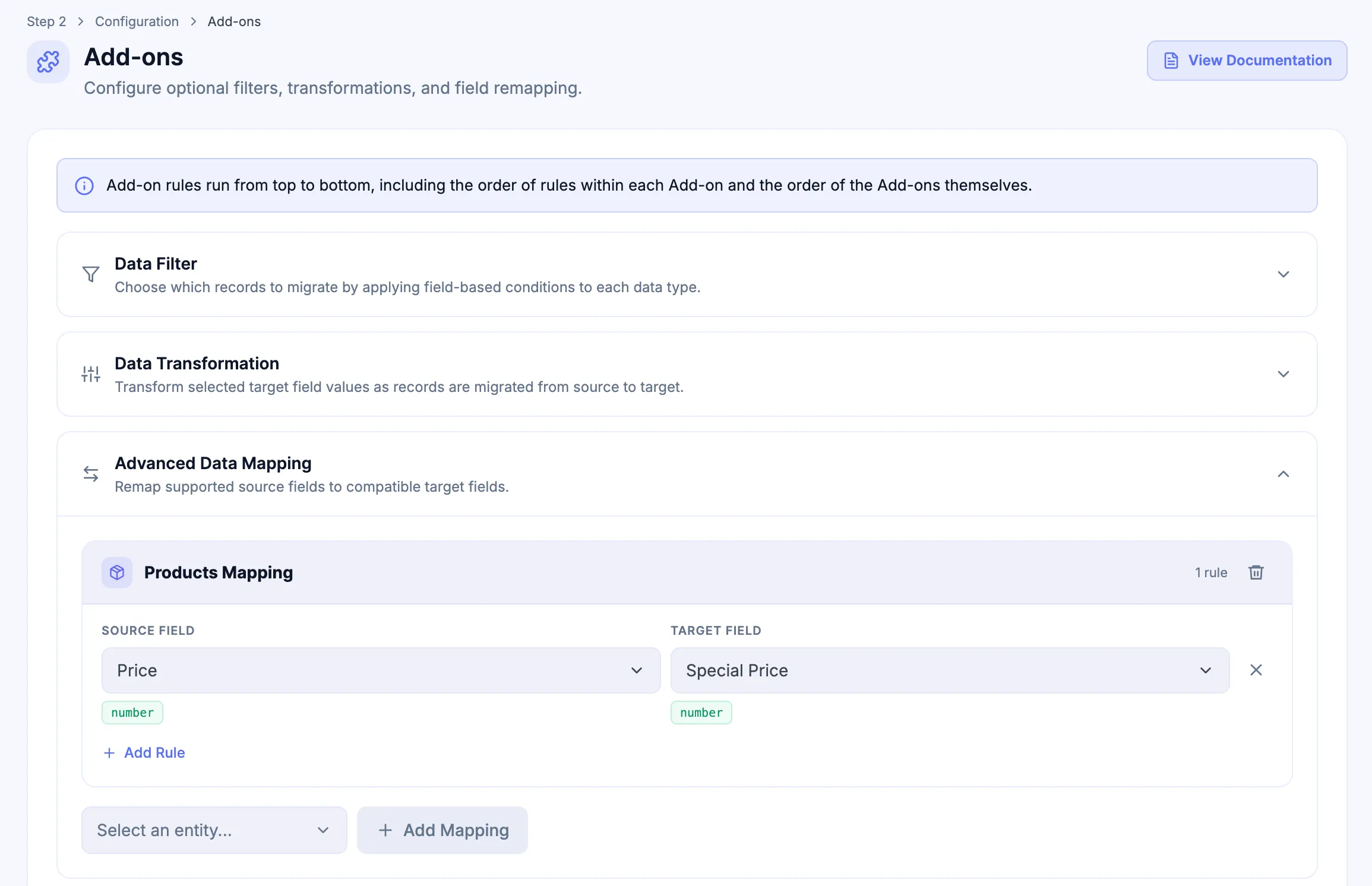
In the Configuration step, expand Advanced Data Mapping, select the entity, and click Add Mapping.
-
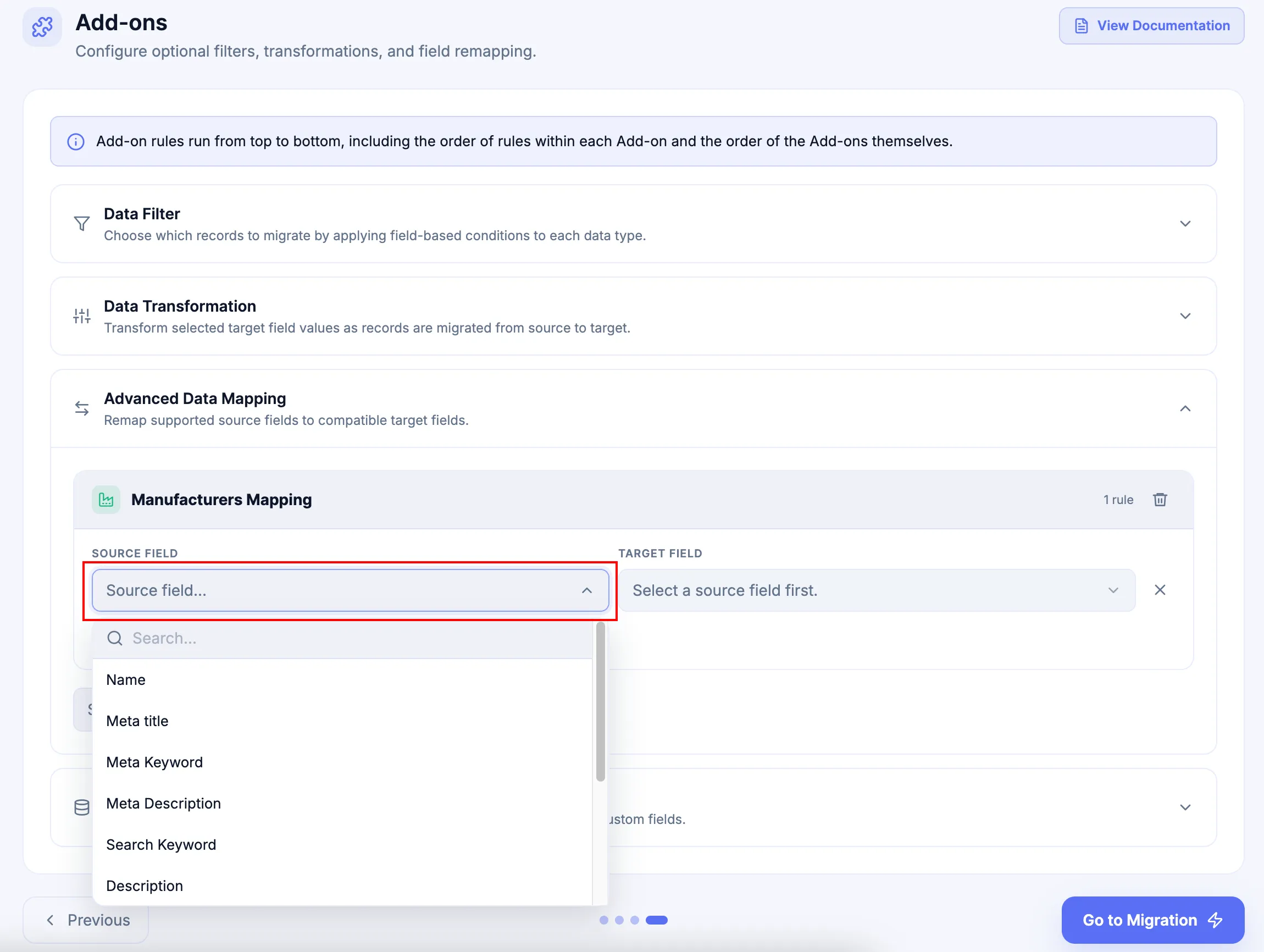
Select the supported Source Field that contains the value to route.
-
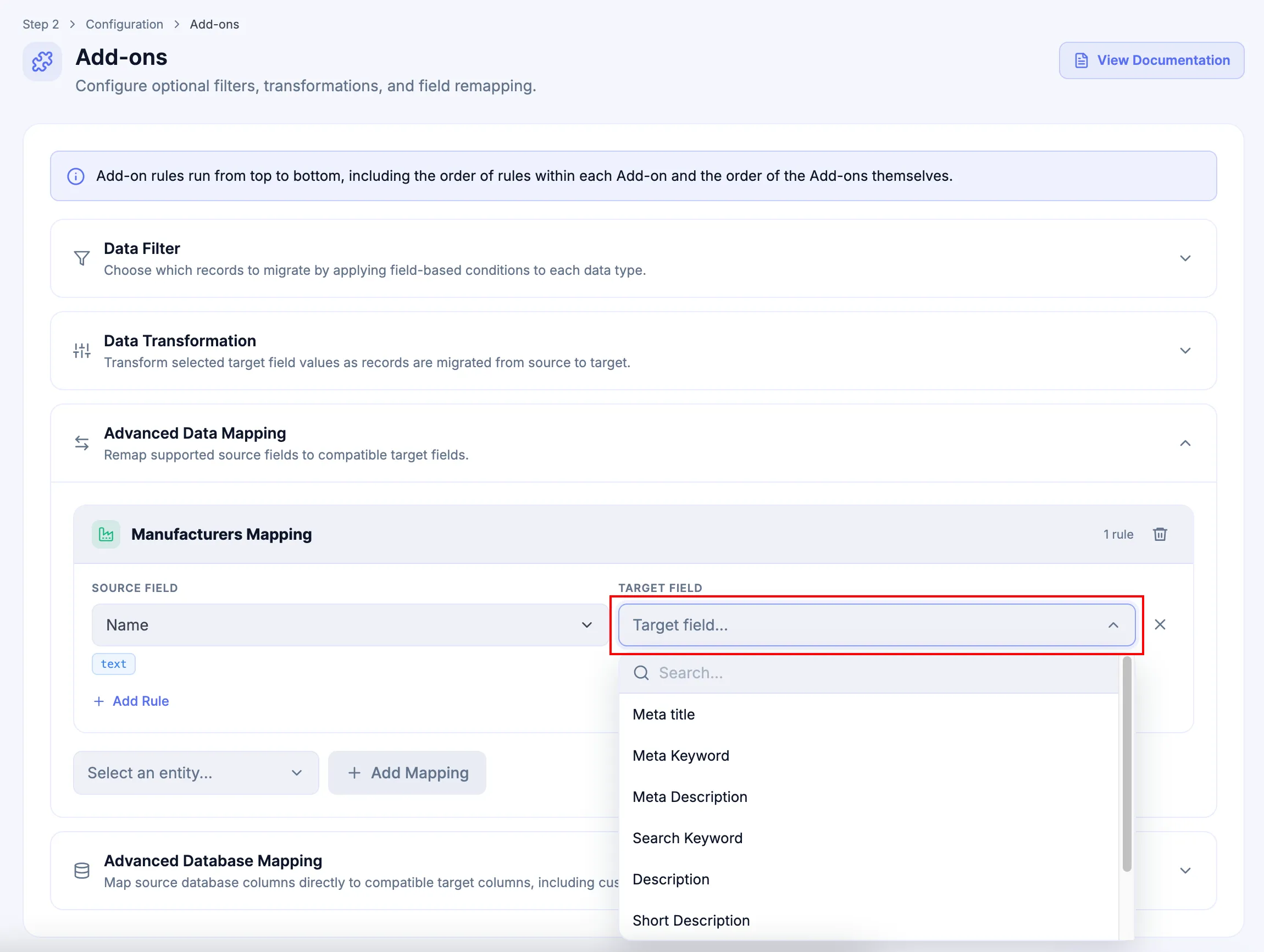
Select the compatible Target Field that should receive the value.
-
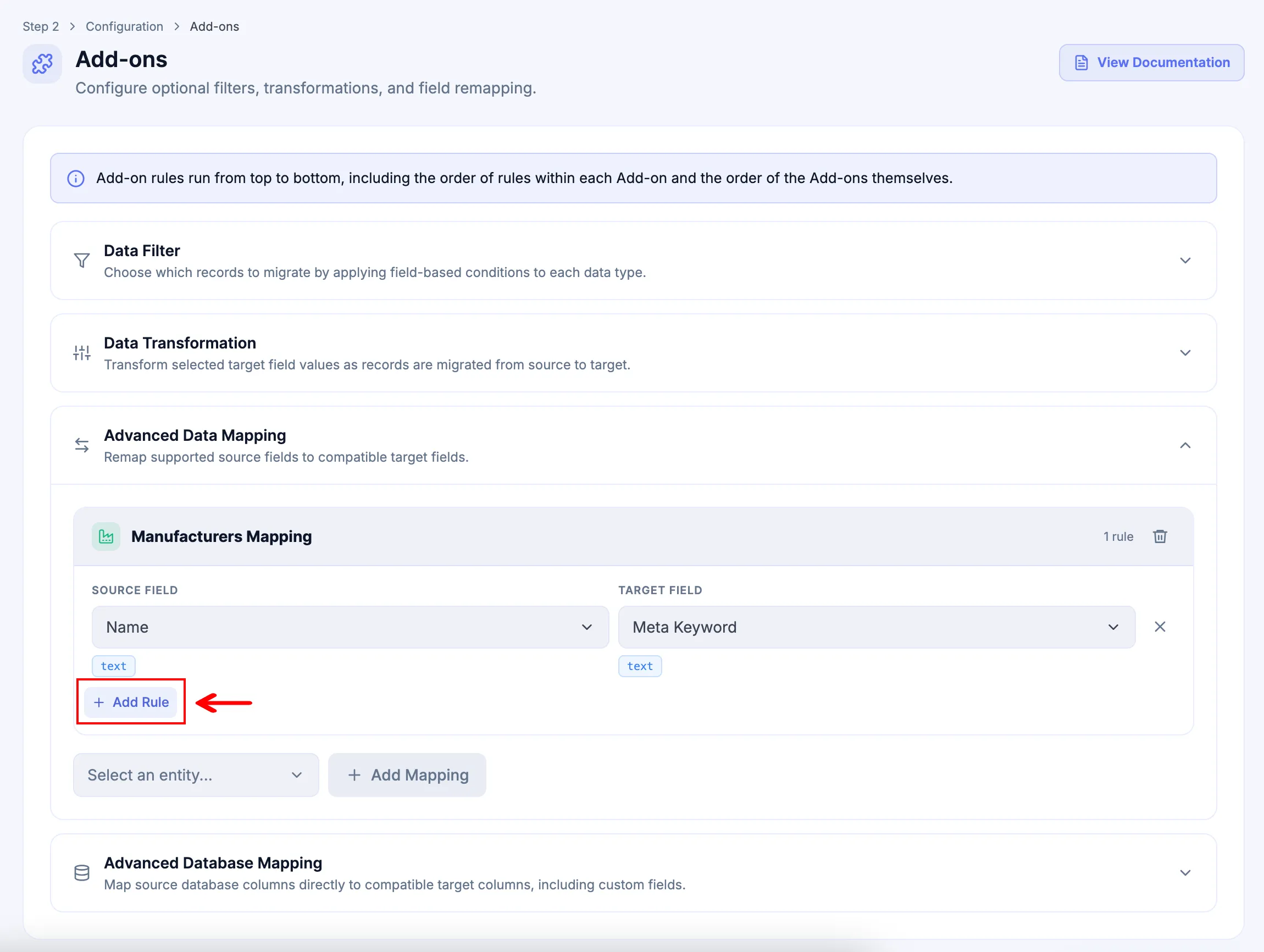
Click Add Rule when another supported field mapping is required for the same entity.
Example: map Price to Special Price
Section titled “Example: map Price to Special Price”When the active migration supports these Product fields, configure:
| Setting | Value |
|---|---|
| Entity | Products |
| Source Field | Price |
| Target Field | Special Price |
If the incoming Price value is 100, Advanced Data Mapping routes that value to Special Price as 100. The mapping itself does not recalculate or transform the value.
Supported fields
Section titled “Supported fields”The available field list depends on the active migration and selected entity. Use the Field Label shown in the Add-on interface and confirm that the Field Type is compatible with the intended destination.
Manufacturer (11 fields)
| Field Label | Field Type |
|---|---|
| Name | text |
| Meta title | text |
| Meta Keyword | text |
| Meta Description | text |
| Search Keyword | text |
| Description | text |
| Short Description | text |
| URL | text |
text | |
| Created Time | datetime |
| Updated Time | datetime |
Category (10 fields)
| Field Label | Field Type |
|---|---|
| Name | text |
| Active | boolean |
| Description | text |
| Short Description | text |
| Meta Title | text |
| Meta Keyword | text |
| Meta Description | text |
| Sort Order | number |
| Created Time | datetime |
| Updated Time | datetime |
Product (34 fields)
| Field Label | Field Type |
|---|---|
| Name | text |
| SKU | text |
| Description | text |
| Short Description | text |
| Meta Title | text |
| Meta Keyword | text |
| Meta Description | text |
| Price | number |
| Special Price | number |
| Special Price Start Date | date |
| Special Price End Date | date |
| Weight | number |
| Weight unit | number |
| Dimensions Unit | number |
| Length | number |
| Width | number |
| Height | number |
| Status | boolean |
| Manage Stock | boolean |
| Quantity | number |
| URL Key | text |
| Cost | number |
| MSRP | text |
| Barcode | text |
| UPC | text |
| EAN | text |
| JAN | text |
| ISBN | text |
| MPN | text |
| GTIN | text |
| BPN | text |
| Google Category ID | text |
| Created Time | datetime |
| Updated Time | datetime |
Customer (36 fields)
| Field Label | Field Type |
|---|---|
| Username | text |
text | |
| First Name | text |
| Middle Name | text |
| Last Name | text |
| Gender | text |
| Date of Birth | date |
| Telephone | text |
| Company | text |
| Fax | text |
| Note | text |
| Tags | text |
| Status | boolean |
| Created Time | datetime |
| Updated Time | datetime |
| Address: First Name | text |
| Address: Middle Name | text |
| Address: Last Name | text |
| Address: Gender | text |
| Address: Address 1 | text |
| Address: Address 2 | text |
| Address: City | text |
| Address: Country Code | text |
| Address: Country | text |
| Address: State Code | text |
| Address: State | text |
| Address: Postcode | text |
| Address: Telephone | text |
| Address: Company | text |
| Address: VAT | text |
| Address: Fax | text |
| Address: Email | text |
| Address: Prefix | text |
| Address: Suffix | text |
| Address: Created Time | datetime |
| Address: Updated Time | datetime |
Order (101 fields)
| Field Label | Field Type |
|---|---|
| Status | text |
| Fulfillment Status | text |
| Tax Title | text |
| Tax Amount | number |
| Tax Percent | number |
| Discount Code | text |
| Discount Title | text |
| Discount Amount | number |
| Discount Percent | number |
| Discount Tax | number |
| Shipping Title | text |
| Shipping Amount | number |
| Shipping Percent | number |
| Shipping Tax | number |
| Shipping Method | text |
| Subtotal Title | text |
| Subtotal Amount | number |
| Subtotal Tax | number |
| Total Title | text |
| Total Amount | number |
| Payment Method | text |
| Payment Title | text |
| Currency | text |
| Increment ID | text |
| PO Number | text |
| Transaction ID | text |
| Tracking Number | text |
| Tracking URL | text |
| Tracking Carrier | text |
| Date Shipped | text |
| Created Time | datetime |
| Updated Time | datetime |
| Customer: Username | text |
| Customer: Email | text |
| Customer: First Name | text |
| Customer: Middle Name | text |
| Customer: Last Name | text |
| Customer: Group Id | text |
| Customer: Telephone | text |
| Customer: Fax | text |
| Customer Address: First Name | text |
| Customer Address: Middle Name | text |
| Customer Address: Last Name | text |
| Customer Address: Email | text |
| Customer Address: Address 1 | text |
| Customer Address: Address 2 | text |
| Customer Address: City | text |
| Customer Address: Country Code | text |
| Customer Address: Country Name | text |
| Customer Address: State Code | text |
| Customer Address: State Name | text |
| Customer Address: Postcode | text |
| Customer Address: Telephone | text |
| Customer Address: Company | text |
| Customer Address: Fax | text |
| Customer Address: Vat | text |
| Billing Address: First Name | text |
| Billing Address: Middle Name | text |
| Billing Address: Last Name | text |
| Billing Address: Email | text |
| Billing Address: Address 1 | text |
| Billing Address: Address 2 | text |
| Billing Address: City | text |
| Billing Address: Country Code | text |
| Billing Address: Country Name | text |
| Billing Address: State Code | text |
| Billing Address: State Name | text |
| Billing Address: Postcode | text |
| Billing Address: Telephone | text |
| Billing Address: Company | text |
| Billing Address: Fax | text |
| Billing Address: Vat | text |
| Shipping Address: First Name | text |
| Shipping Address: Middle Name | text |
| Shipping Address: Last Name | text |
| Shipping Address: Email | text |
| Shipping Address: Address 1 | text |
| Shipping Address: Address 2 | text |
| Shipping Address: City | text |
| Shipping Address: Country Code | text |
| Shipping Address: Country Name | text |
| Shipping Address: State Code | text |
| Shipping Address: State Name | text |
| Shipping Address: Postcode | text |
| Shipping Address: Telephone | text |
| Shipping Address: Company | text |
| Shipping Address: Fax | text |
| Shipping Address: Vat | text |
| Item: Product Name | text |
| Item: Product Sku | text |
| Item: Qty | number |
| Item: Price | number |
| Item: Original Price | number |
| Item: Tax Amount | number |
| Item: Tax Percent | number |
| Item: Discount Amount | number |
| Item: Discount Percent | number |
| Item: Subtotal | number |
| Item: Total | number |
| Item: Created At | datetime |
| Item: Updated At | datetime |
Review (8 fields)
| Field Label | Field Type |
|---|---|
| Product Name | text |
| Customer Name | text |
| Customer Email | text |
| Title | text |
| Content | text |
| Status | boolean |
| Created Time | datetime |
| Updated Time | datetime |
Page (9 fields)
| Field Label | Field Type |
|---|---|
| Status | boolean |
| Created Time | datetime |
| Updated Time | datetime |
| Name | text |
| Description | text |
| Short Description | text |
| Meta Title | text |
| Meta Keyword | text |
| Meta Description | text |
Post (9 fields)
| Field Label | Field Type |
|---|---|
| Status | boolean |
| Created Time | datetime |
| Updated Time | datetime |
| Name | text |
| Description | text |
| Short Description | text |
| Meta Title | text |
| Meta Keyword | text |
| Meta Description | text |
Coupon (17 fields)
| Field Label | Field Type |
|---|---|
| Coupon Code | text |
| Description | text |
| Value | text |
| Value Type | text |
| Start Date | date |
| End Date | date |
| Min Spend | number |
| Max Spend | number |
| Min Quantity | number |
| Max Quantity | number |
| Usage Count | number |
| Usage Total | number |
| Usage Customer | number |
| Free Shipping | boolean |
| Status | boolean |
| Created Time | datetime |
| Updated Time | datetime |
Rule order and removal
Section titled “Rule order and removal”Mapping rules inside an Entity Mapping run from top to bottom. Review competing destinations before execution instead of assuming an undocumented conflict-resolution behavior.
-
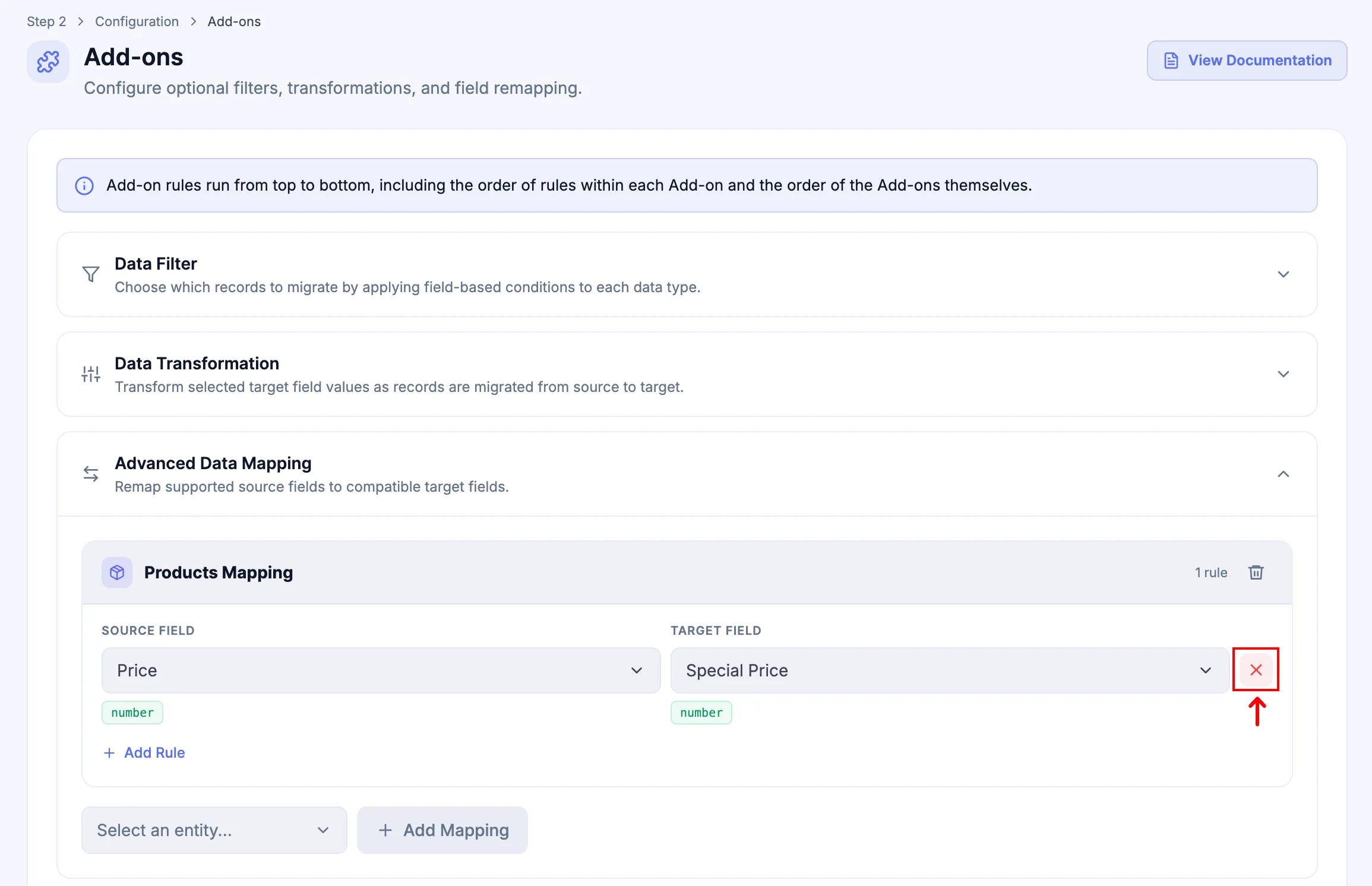
Click x to remove an individual mapping rule.
-
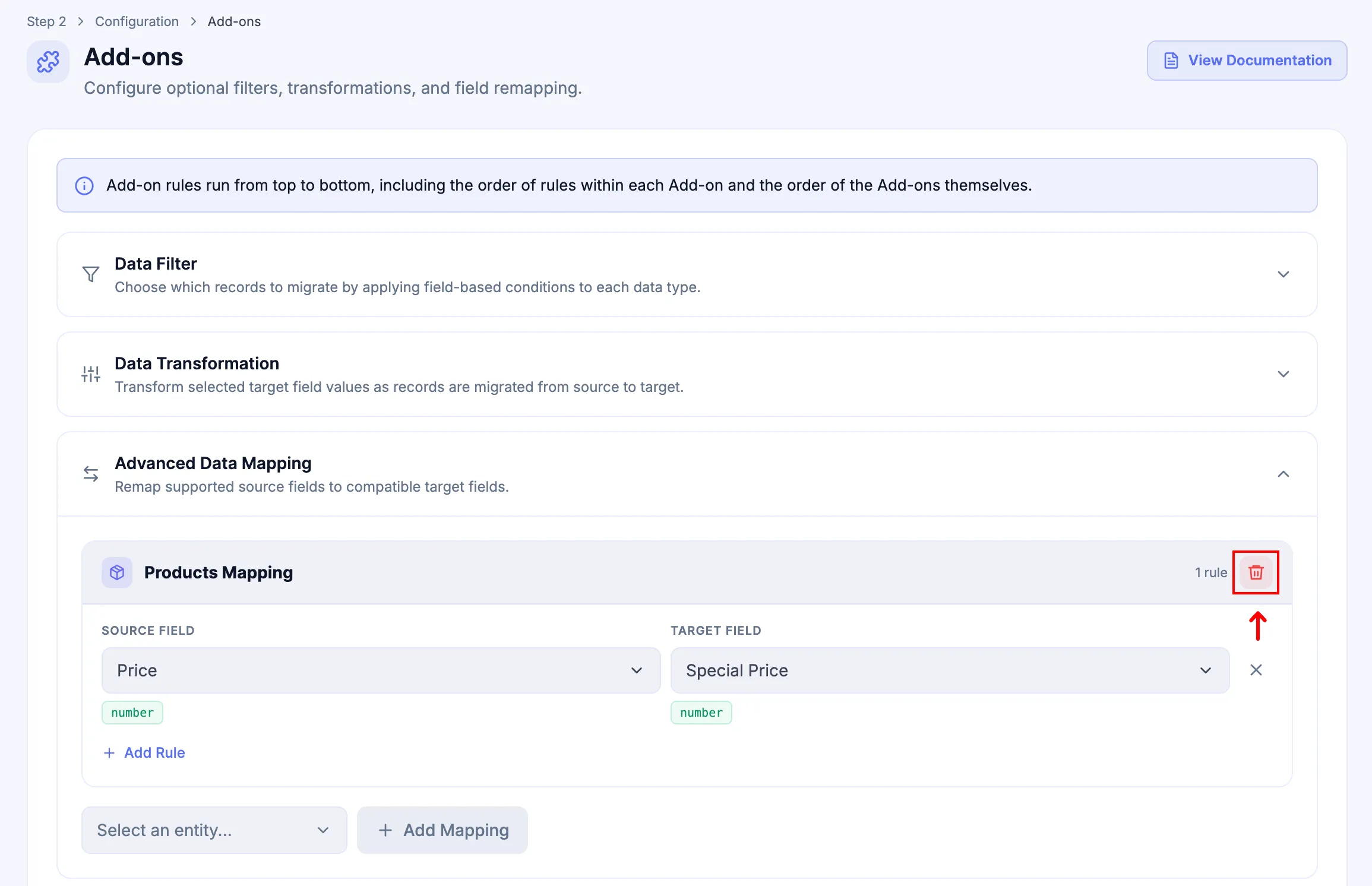
Use the remove control for the Entity Mapping to delete the entire mapping group.
Next Steps
Section titled “Next Steps”If Advanced Database Mapping is included and the exact Source setup, Target Platform, and requested schema destination are eligible, configure it next. Otherwise continue to the next applicable screen shown in Add-ons.